NFL DFS Matchup Tool Guide
The NFL DFS Matchup Tool shows what every defense allows to quarterbacks, running backs, wide receivers and tight ends: the raw stats, the fantasy points on DraftKings and FanDuel, and a color-graded rank. It then lines each defense up with this week's opponent, so you can see which players get the soft spots.
- AccessFree preview. Full board with FTA+
- Best forPicking between similar players by matchup, and finding the defenses to attack on a slate.
- 1 / 11FTA+ TOOL GUIDE
How to read the NFL DFS Matchup Tool
What each defense allows, by position, lined up with this week's opponent
 1234
- 1Header: which season's stats are in the table, which week's matchups they are ranked for, and the date of the last update
- 2Controls: position tabs, Teams or Players view, DK or FD, and search
- 3Color key for the rank badges
- 4Two header rows: the group names on top, the column names under them. Click a column name to sort
Every row in the main view is a defense. Reading across, you see the stats it has allowed to one position, the fantasy points that adds up to on each site, a graded rank, and the team it plays next. The best matchups sit at the top.
- 2 / 11THE CONTROLS
Four controls set the whole table
Position, view, site and search
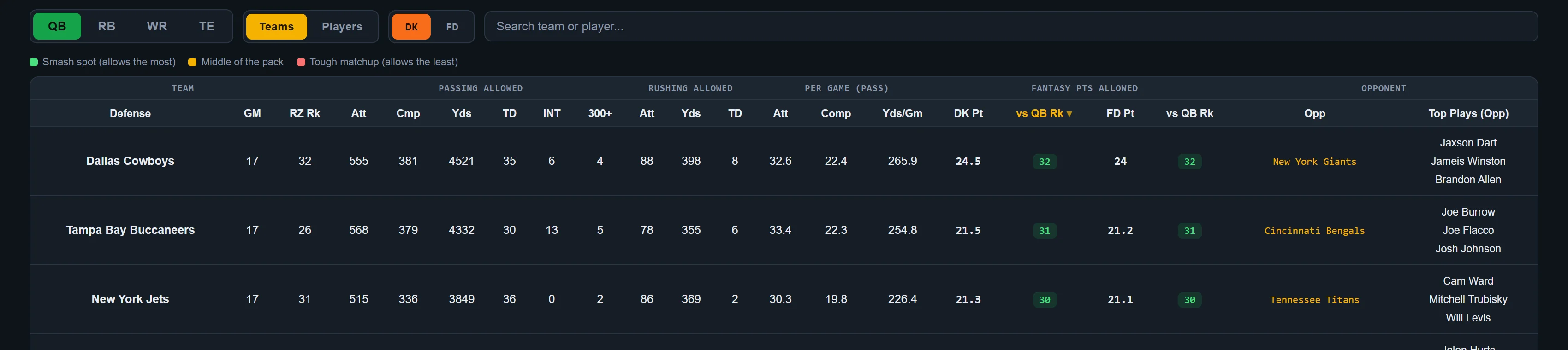 1234
- 1Position tabs: QB, RB, WR or TE. The green tab is on screen
- 2Teams or Players: one row per defense, or one row per offensive player
- 3DK or FD: DraftKings (DK) or FanDuel (FD). It sets which site's rank the table sorts by and which site's points the Players view shows
- 4Search: filter by team name, or by player name in the Players view. Search is an FTA+ feature
Pick the position first, because the columns change with it. Then choose whether you want to read defenses (Teams) or go straight to the players who face them (Players).
- 3 / 11THE COLOR KEY
Green is a smash spot, red is a tough matchup
On this tool a higher rank number means a softer defense
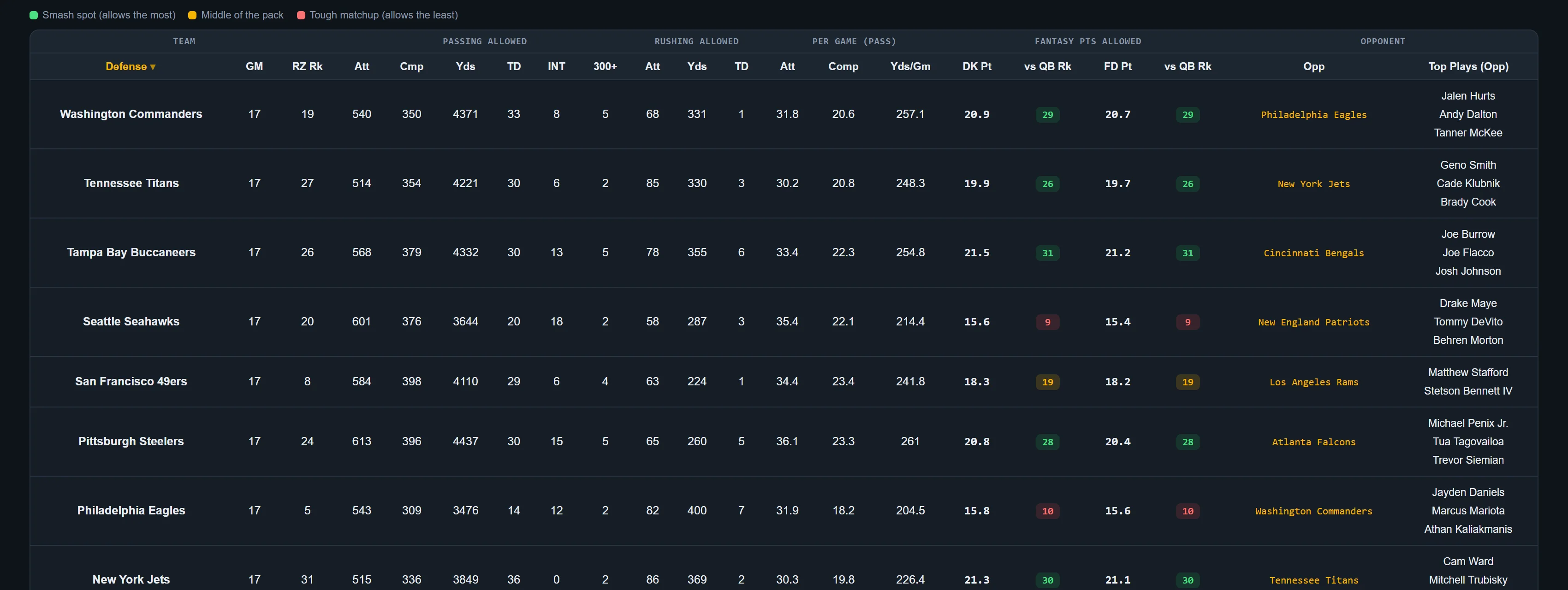 1234
- 1The key: green allows the most, gold is the middle of the pack, red allows the least
- 2Green badge: ranks 22 to 32. A smash spot, meaning a matchup that lifts the whole position
- 3Gold badge: ranks 11 to 21. The matchup neither helps nor hurts much
- 4Red badge: ranks 1 to 10. A tough matchup
The rank badge is the quick read. Ranks run from 1 to 32 across the league. The defense that allows the most fantasy points to the position gets the highest number and a green badge. The defense that allows the least gets a low number and a red badge.
TipThis runs the opposite way from the FPPG Allowed pages, where rank 1 is the softest. Trust the colors: green means good for the offense on both tools.
- 4 / 11TEAMS VIEW, PART 1
The defense, its games and its red zone rank
The first three columns stay with every position
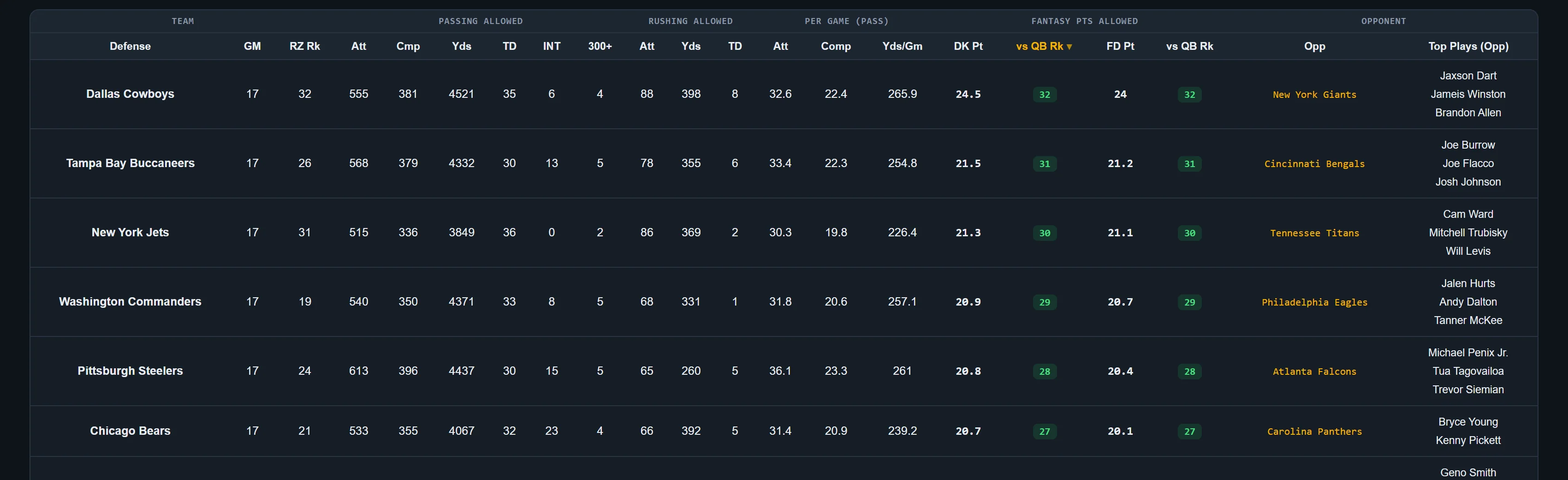 123
- 1Defense: the team whose defense the row describes
- 2GM: games in the sample. The season totals in the row cover this many games
- 3RZ Rk: the defense's red zone rank against this position. Like the matchup rank, a higher number is a more generous defense near the goal line
The Defense column is pinned to the left edge, so the team name stays in view when a wide table scrolls sideways on a smaller screen.
TipRZ Rk has no color. Use it as a tiebreaker for touchdown upside when two matchups grade the same.
- 5 / 11TEAMS VIEW, PART 2
Season totals and per game averages allowed
The raw stats behind the fantasy points
 123
- 1Passing Allowed: attempts, completions, yards, touchdowns and interceptions thrown against this defense, plus 300+, the number of 300 yard passing games it has given up
- 2Rushing Allowed: quarterback carries, rushing yards and rushing touchdowns allowed. High numbers here favor running quarterbacks
- 3Per Game (Pass): attempts, completions and passing yards allowed per game. This is the volume a quarterback can expect
These columns show how a defense gives up its points. On the QB tab you see passing allowed, quarterback rushing allowed and per game passing volume. Two defenses can allow the same fantasy points in very different ways, and the difference tells you which kind of player benefits.
TipThe 300+ column matters on DraftKings, which pays a bonus for a 300 yard passing game.
- 6 / 11TEAMS VIEW, PART 3
Fantasy points allowed and this week's opponent
The payoff columns on the right side of the table
 1234
- 1DK Pt and its rank: DraftKings points per game allowed to the position, in orange, with the graded rank badge
- 2FD Pt and its rank: the same in FanDuel scoring, in blue. Both sites are always shown in the Teams view
- 3Opp: the offense this defense faces in the week being ranked
- 4Top Plays (Opp): the opponent's top players at the position by depth chart. These are the players who draw this matchup
This is where the row turns into a decision. The points and rank say how soft the defense is. Opp and Top Plays say who gets to face it. The last two columns are pinned to the right edge so they stay visible.
TipThe table opens sorted by the rank for the site you picked, softest defense first. The arrow in the header shows the sorted column.
- 7 / 11TEAMS VIEW, PART 4
The columns change with the position
RB adds touches and receiving. WR and TE show receiving first
 123
- 1RB, Rushing Allowed: touches (Tch), carries (Att), yards, yards per carry, touchdowns and 100+, the count of 100 yard rushing games allowed
- 2RB, Receiving Allowed: targets, catches, yards and touchdowns allowed to backs through the air, and 100 yard receiving games. This is where pass-catching backs find their matchups
- 3Per Game: touches, carries, yards and yards per carry allowed per game
The layout is the same on every tab: team block, season totals allowed, per game averages, fantasy points, opponent. Only the stat groups change to fit the position.
TipOn the WR and TE tabs the groups are Receiving Allowed (targets, catches, yards, touchdowns, 100 yard games), Rushing Allowed to that position, and per game targets, catches and yards.
- 8 / 11PLAYERS VIEW
Flip it around: one row per player
Every depth chart player at the position, graded by the defense he faces
 12345
- 1Player and Team. Click Player, Team, Depth or vs Rk to sort
- 2Depth: Starter, or his place on the depth chart (#2, #3 and so on)
- 3Opp: the defense he faces
- 4Allowed Pts and vs Rk: the fantasy points that defense allows to his position, and its graded rank. Green is a smash spot
- 5Last Wk: his fantasy score from the previous week when it is available. Two dashes mean no score is loaded
The Players view answers the question you actually have on a slate: which players have the best matchup this week? It opens with the best matchups on top.
TipAllowed Pts is what the defense gives up to the whole position group, not a projection for this player. A third-string player in a green matchup is still a third-string player. Read Depth first.
- 9 / 11THE SITE SWITCH
Switch between DraftKings and FanDuel
The points and the rank follow the site you choose
 123
- 1FD is lit in blue. DK lights up orange
- 2Allowed Pts: now in FanDuel scoring, shown in blue
- 3vs Rk: the rank for the FanDuel number. It can differ from the DraftKings rank for the same defense
DraftKings gives a full point per catch and FanDuel gives half a point, so pass catchers score more on DK. A defense that allows a lot of short catches can grade softer on DK than on FD. Always set the switch to the site you are playing before you read the ranks.
- 10 / 11FREE PREVIEW
What you get free and with FTA+
Free visitors see the top 8 rows. Members see everything
 123
- 1Search is greyed out for free visitors. It is an FTA+ feature
- 2Free: the top 8 rows, with every column, tab, sort and both sites
- 3FTA+: every defense and every player, all season, on DK and FD. The banner shows how many rows are hidden
The free view shows the 8 best matchups at each position in the Teams view, and the first 8 players in the Players view, on both sites. The rows after that are blurred behind the FTA+ banner, and the search box is switched off.
NFL DFS Matchup Tool glossary
- Smash spot
- A matchup against a defense that allows a lot of fantasy points to the position. Green badge.
- Tough matchup
- A defense that allows very few fantasy points to the position. Red badge.
- vs QB Rk / vs RB Rk / vs WR Rk / vs TE Rk
- The defense's rank from 1 to 32 in fantasy points allowed to that position. On this tool a higher number means more points allowed, so a softer matchup. There is one for DraftKings and one for FanDuel.
- DK Pt / FD Pt
- Fantasy points per game the defense allows to the position, in DraftKings or FanDuel scoring.
- Allowed Pts
- In the Players view: the points per game the player's opponent allows to his position, for the site you picked.
- GM / G
- Games in the sample.
- RZ Rk
- Red zone rank against the position. A higher number is a more generous defense near the goal line.
- Att / Cmp / Yds / TD / INT
- Attempts, completions, yards, touchdowns and interceptions allowed. Under Rushing Allowed, Att means carries.
- 300+ / 100+
- The number of 300 yard passing games, or 100 yard rushing or receiving games, the defense has allowed.
- Tch
- Touches allowed to running backs: carries plus catches.
- Tgt / Rec
- Targets and receptions allowed.
- Yds/Att
- Rushing yards allowed per carry.
- Yds/Gm
- Yards allowed per game.
- Per Game
- The group of columns that divides the season totals by games played.
- Opp
- This week's opponent: the offense a defense faces in the Teams view, or the defense a player faces in the Players view.
- Top Plays (Opp)
- The opposing offense's top players at the position by depth chart. They are the ones who get the matchup.
- Depth
- A player's spot on his team's depth chart. Starter is first string.
- Last Wk
- The player's fantasy score from the previous week, when it is loaded.
NFL DFS Matchup Tool questions
Is a high rank good or bad?
On this tool a high rank number is good for the offensive player. Rank 32 is the defense that allows the most fantasy points to the position, and it is shown in green.
What is the difference between the Teams and Players views?
Teams lists the 32 defenses with everything they allow. Players lists the offensive players and grades each one by the defense he faces. Same data, read from the other side.
Why are DK and FD numbers different?
The sites score differently. DraftKings gives a full point per catch and FanDuel gives half a point, so the same stats allowed turn into different fantasy points, and sometimes a different rank.
What do free visitors see?
The top 8 rows of each view, with all columns and both sites. FTA+ shows every team and player and turns on search.
Is Allowed Pts a projection for the player?
No. It is what the opposing defense gives up to the whole position. Use it with the player's role and the FTA projections.